
windows+R
run msconfig
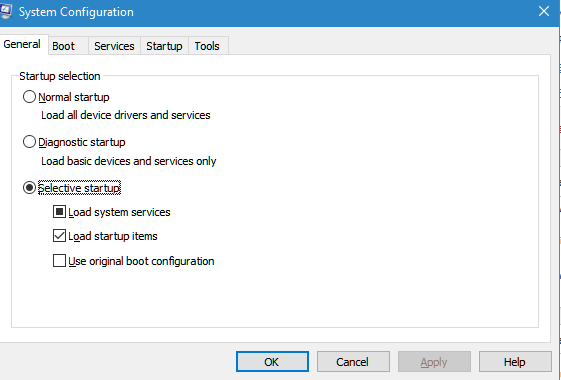
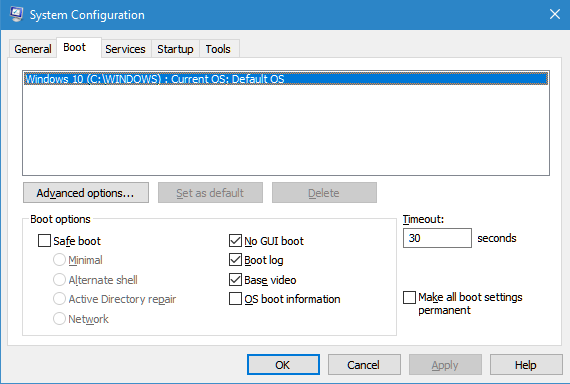
Base video is what is important
=-=-=-=-=-=-
Any change related to graphic card (programmatically or manually ) on “brightness” during the boot process or even after boot causes boot immediate shutdown this can be caused by having different power profiles for with power or with battery
Change of resolution after boot is fine but must return to original windows default card resolution to prevent change of resolution during boot
Setting and staying with basic video that system boot with is necessary
There should be no difference in power profiles
Enabling of Wireless LAN during boot process leads to shutdown
Enable Wireless LAN after boot and disable before shutdown
therefore nothing should change during the boot process
Power cord must be detached during boot process.
Slowing the processor speed during shutdown and boot seems to be not effective
There is possibility to Disable graphics mode for boot applications and uses text-mode display.
bcdedit /set {current} graphicsmodedisabled on
=-=-=-=-=-=-=-=-=-=-=-=-=-
delete all uncessary apps
remove clearly all past virus killer
Stop unnecessary services
=-=-=-=-=-=-=-=-=-=-
after successful start
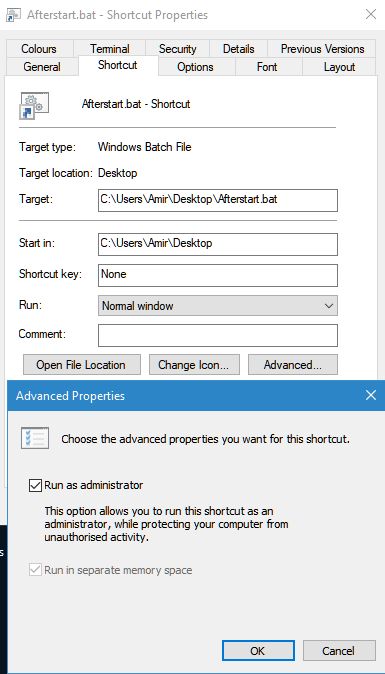
a bat file that must be run as administrator afterstart.bat on desktop
cd \users\amir\desktop
rem powershell -ExecutionPolicy Bypass -File “\users\amir\desktop\Set-Resolution.ps1” -Width 1366 -Height 768
powercfg -attributes SUB_PROCESSOR CPMAXFREQ -ATTRIB_HIDE
powercfg.exe -attributes sub_processor perfboostmode -attrib_hide
powercfg -setdcvalueindex scheme_current sub_processor procthrottlemin 100
powercfg -setactive scheme_current
powercfg -setacvalueindex scheme_current sub_processor procthrottlemax 100
powercfg -setactive scheme_current
netsh interface set interface “Wireless Network Connection” admin=enable
netsh wlan connect name=”371newnet”
powershell (Get-WmiObject -Namespace root/WMI -Class WmiMonitorBrightnessMethods).WmiSetBrightness(1,50)
before shot down a batch file to slow down power consumption similar to safe mode beforeshotdown.bat on desktop
netsh interface set interface “Wireless Network Connection” admin=disable
powercfg -setdcvalueindex scheme_current sub_processor procthrottlemin 5
powercfg -setactive scheme_current
powercfg -setacvalueindex scheme_current sub_processor procthrottlemax 40
powercfg -setactive scheme_current
powershell (Get-WmiObject -Namespace root/WMI -Class WmiMonitorBrightnessMethods).WmiSetBrightness(1,1)
rem powershell -ExecutionPolicy Bypass -File “\users\amir\desktop\Set-Resolution.ps1” -Width 800 -Height 600
rem bcdedit /set {current} vga yes
to make it easier to run just create shortcuts and during the shortcut making make their property to run as admin
=-=-=-=-=-=-=-=-=-=-=-=-=-=-=-=-=-=-=-
Create a power shell script on desktop if resolution change is needed
C:\Users\Amir\Desktop\Set-Resolution.ps1
param([int]$Width, [int]$Height)
$code = @”
using System;
using System.Runtime.InteropServices;
namespace Resolution {
[StructLayout(LayoutKind.Sequential)]
public struct DEVMODE {
[MarshalAs(UnmanagedType.ByValTStr, SizeConst = 32)] public string dmDeviceName;
public short dmSpecVersion;
public short dmDriverVersion;
public short dmSize;
public short dmDriverExtra;
public int dmFields;
public int dmPositionX;
public int dmPositionY;
public int dmDisplayOrientation;
public int dmDisplayFixedOutput;
public short dmColor;
public short dmDuplex;
public short dmYResolution;
public short dmTTOption;
public short dmCollate;
[MarshalAs(UnmanagedType.ByValTStr, SizeConst = 32)] public string dmFormName;
public short dmLogPixels;
public short dmBitsPerPel;
public int dmPelsWidth;
public int dmPelsHeight;
public int dmDisplayFlags;
public int dmDisplayFrequency;
public int dmICMMethod;
public int dmICMIntent;
public int dmMediaType;
public int dmDitherType;
public int dmReserved1;
public int dmReserved2;
public int dmPanningWidth;
public int dmPanningHeight;
}
public class Primary {
[DllImport(“user32.dll”)]
public static extern int ChangeDisplaySettings(ref DEVMODE devMode, int flags);
public static void Change(int width, int height) {
DEVMODE dm = new DEVMODE();
dm.dmSize = (short)Marshal.SizeOf(dm);
dm.dmPelsWidth = width;
dm.dmPelsHeight = height;
dm.dmFields = 0x00080000 | 0x00100000; // dmPelsWidth | dmPelsHeight
ChangeDisplaySettings(ref dm, 0);
}
}
}
“@
Add-Type -TypeDefinition $code
[Resolution.Primary]::Change($Width, $Height)
